
Download GameHike – gaming optimization, computer performance, game booster, system tuning, gaming tool, performance enhancement, PC optimization, game settings, gaming PC, game speed, game boost, game performance, PC booster, system optimization, game tuning
Overview
GameHike is a specialized tool designed to enhance the performance of gaming systems by automatically analyzing and adjusting computer settings. Its primary purpose is to optimize system configurations to deliver smoother gameplay, faster load times, and improved graphical stability across a wide range of games. By streamlining background processes, adjusting power settings, and fine-tuning system resources, GameHike aims to help users extract maximum performance from their hardware without requiring technical expertise. The app is particularly beneficial for gamers who want to eliminate lag, stuttering, or frame drops without manually tweaking system parameters.
Target users include casual and competitive gamers using Windows-based PCs who seek a hassle-free way to boost their gaming experience. Whether playing high-demand titles or older games that struggle on modern systems, GameHike provides a consistent performance uplift. The tool is especially useful for users with mid-tier or older hardware who want to extend the usability of their machines. It fits into the broader productivity and utility category, despite serving a gaming-focused audience, by offering system-level improvements that benefit overall device efficiency.
Developed by GameHike, the application has been available since May 13, 2014, indicating a long-standing presence in the PC optimization space. Although the developer did not provide additional technical details about the underlying algorithms or system integration methods, the consistent release of updates suggests ongoing support and refinement. Real-world use cases include preparing a system before launching a new game, improving performance during online multiplayer sessions, or reviving older PCs for modern gaming.
Key Features & Functionality
- Automatic Optimization: GameHike conducts a full system analysis and applies targeted adjustments to improve gaming performance. This includes disabling non-essential startup programs, optimizing power settings, and adjusting visual effects to prioritize gaming tasks.
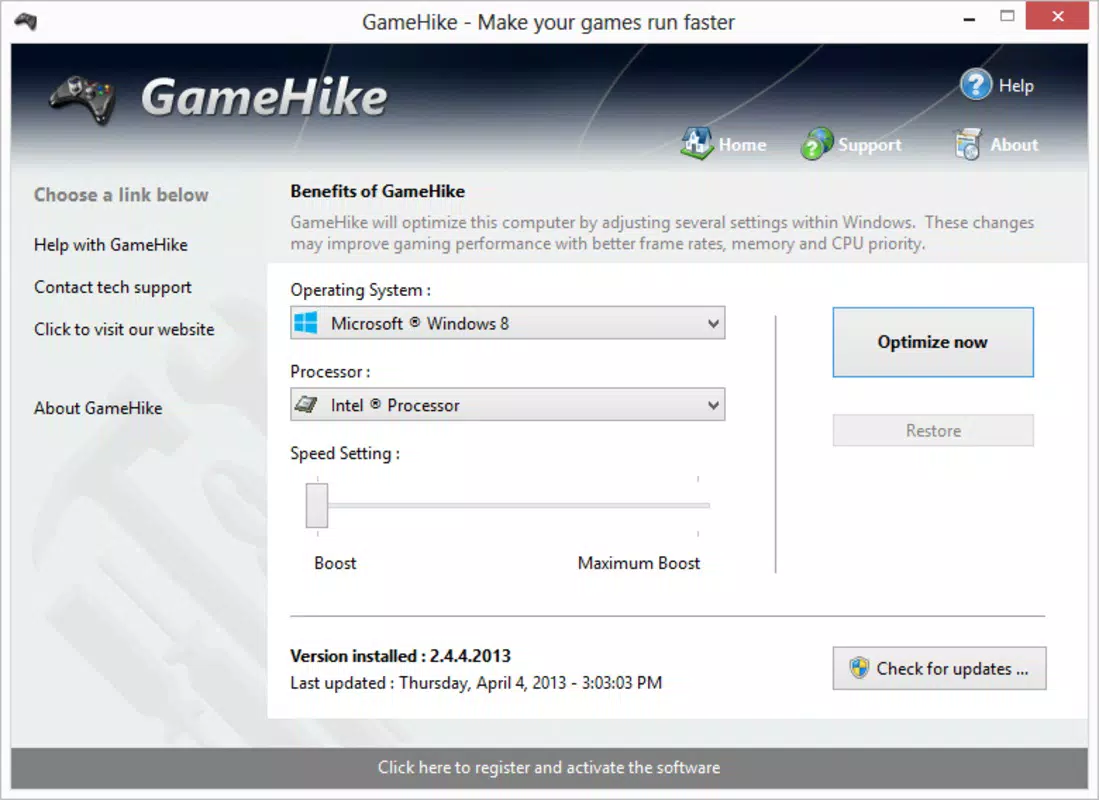
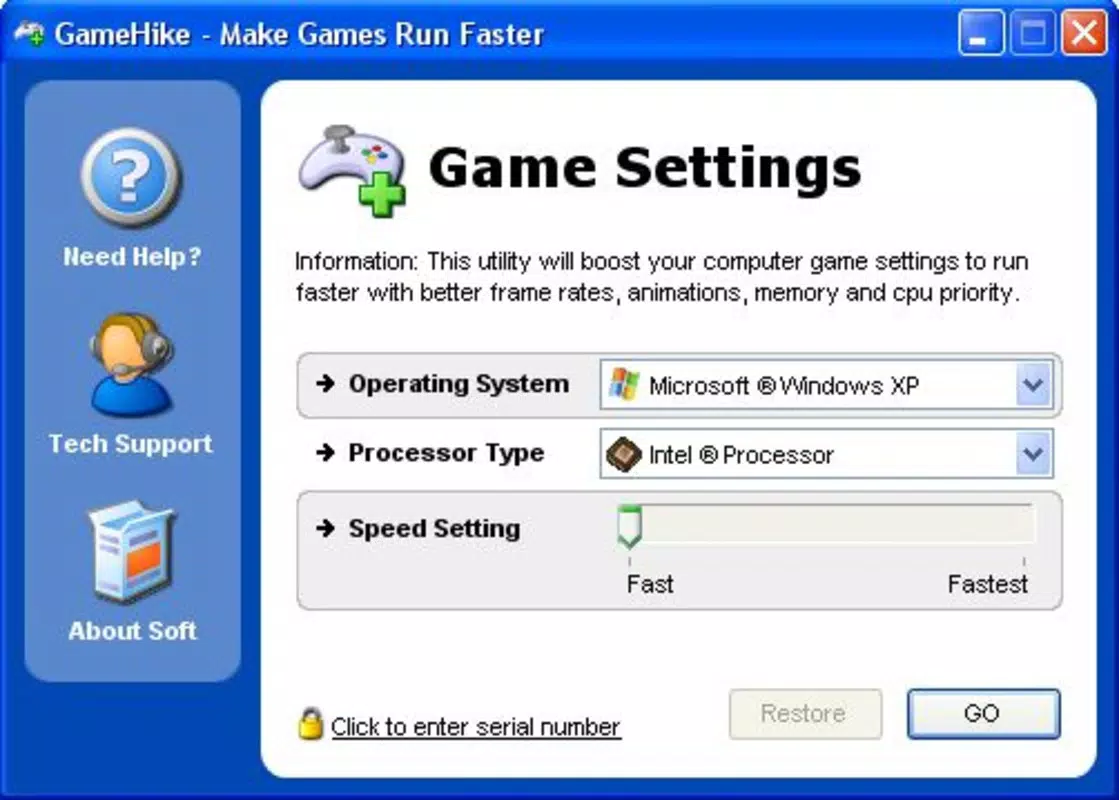
- User-Friendly Interface: The app features a minimalistic design with a single "OK" button to initiate the optimization process. This approach ensures accessibility for users with limited technical knowledge, allowing them to enhance performance with minimal interaction.
- Improved Gaming Experience: By reallocating system resources and reducing background interference, GameHike helps deliver smoother frame rates, faster level loading, and reduced input lag, contributing to a more immersive gameplay environment.
- Performance Squeeze: The tool is designed to unlock hidden performance potential in existing hardware, enabling users to achieve better results without upgrading components. This is especially valuable for budget-conscious gamers or those with legacy systems.
For example, a user preparing to play a graphically intensive game like Cyberpunk 2077 can use GameHike to ensure their system is fully optimized before launch. The app would automatically adjust settings to prioritize gaming processes, freeing up CPU and GPU resources. Similarly, a streamer using a mid-range PC can benefit from reduced background interference, leading to more stable broadcasts and gameplay.
Interface, UX & Performance
GameHike presents a clean, minimal interface focused on simplicity and immediate usability. The main screen features a single prominent button labeled “OK,” which triggers the system analysis and optimization sequence. This design choice emphasizes accessibility, allowing users of all experience levels to engage with the tool without confusion. Navigation is straightforward, with no complex menus or layered options, ensuring a frictionless experience.
Visual style is functional rather than decorative, with a dark-themed layout that reduces eye strain during extended use. The interface remains responsive during the optimization process, providing real-time feedback through progress indicators. Although the developer did not list formal performance metrics, the app operates efficiently within its 34.5 MB file size, suggesting low system overhead.
Performance across different device categories appears consistent based on the app’s lightweight nature. It is designed to run on standard Windows systems without consuming excessive memory or CPU. Stability is maintained through a streamlined execution path that avoids unnecessary background processes. While specific compatibility details were not disclosed, the app functions as a system-level utility, suggesting it integrates with core Windows services to make real-time adjustments.
Platform Compatibility & Technical Requirements
GameHike is available exclusively for the Windows platform. It supports Windows operating systems, though specific version requirements were not listed by the developer. The application has a file size of 34.5 MB, indicating a lightweight installation that does not require significant storage space.
Given its release date in 2014 and continued availability, the app likely supports a broad range of Windows versions, including Windows 7, 8, and 10. However, compatibility with newer Windows 11 systems or future updates was not confirmed. The developer did not specify minimum OS requirements, so users should exercise caution when installing on updated or less common configurations.
Pros and Cons
Pros
- Simple one-click optimization process for effortless use.
- Designed for users with no technical background.
- Lightweight installation at only 34.5 MB.
- Free to download and use with no hidden costs.
- Focuses on gaming performance without unnecessary features.
Cons
- Specific OS compatibility details were not provided.
- No visible update history or changelog available.
- Developer did not disclose technical implementation methods.
- May not offer granular control for advanced users.
- Performance gains may vary depending on hardware configuration.
FAQ
Is GameHike safe to use on my PC?
Yes, GameHike is designed to make reversible system changes. It does not modify critical system files or install third-party software. However, users should ensure they are downloading the app from official sources to avoid potential risks.
Can I use GameHike on Windows 11?
While the app has been available since 2014, the developer did not specify compatibility with Windows 11. It may work on newer systems, but users should verify functionality on their specific setup.
Does GameHike require an internet connection?
There is no indication that GameHike requires an internet connection during operation. It functions as a local system utility, performing optimizations without relying on cloud services.
How often should I run GameHike?
Users can run GameHike before starting a new game or when noticing performance issues. There is no set frequency, as the app does not make permanent changes that would require constant reapplication.
Is GameHike available for macOS or Linux?
Currently, GameHike is only available for Windows. The developer did not provide information about future releases for other platforms.
Final Thoughts + CTA
GameHike stands out as a no-frills, effective solution for gamers seeking a quick and reliable way to enhance their PC’s gaming performance. Its one-click optimization process removes the complexity of manual system tuning, making it ideal for users who value simplicity and immediate results. While it lacks advanced customization options, its focused approach delivers tangible benefits for everyday gaming scenarios.
For casual gamers, students, or anyone using a Windows PC for gaming, GameHike offers a practical tool to squeeze more performance from existing hardware. Its free availability and minimal system footprint further enhance its appeal. Despite limited technical transparency, the app remains a functional utility in the productivity and gaming optimization space.
Download GameHike now


